
Hosted SPA
Best for: dedicated internal tools or admin panels where retrofit-ui owns the entire page at a URL like /admin.
In this style, your server serves the pre-built SPA bundle as static files. The browser loads it once, reads /retrofit.json to learn where your spec endpoints live, and handles all routing and rendering through a hash router. You never touch frontend code — every change to your schema is immediately reflected in the UI on the next page load.
How it works
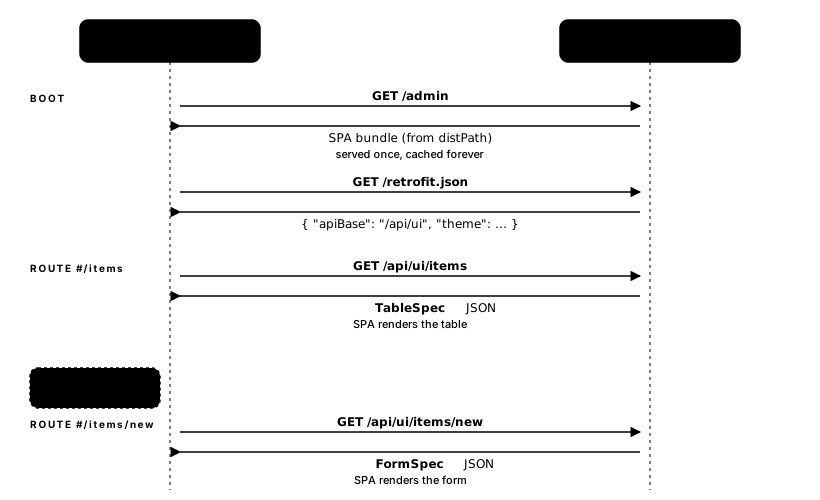
#/items, #/items/new). Each route triggers one spec fetch; the SPA replaces its content in place — no full page reload. The SPA manages the hash URL (#/items, #/items/new, #/items/42). Each route fetches the corresponding spec endpoint and renders the right view. Your server adds spec endpoints and the bundle handles everything else.
Setup
Install
pnpm add @retrofit-ui/builder-zod @retrofit-ui/spa-solid-shoelaceWire up the server
Pick your own URL prefix
apiBase is a prefix retrofit-ui prepends to the resource name when it fetches specs — nothing else magic about it. Set it to whatever fits your server: /api/ui, /admin-ui, /ui/v2, or just /. The /api/ui shown below is only a convention that reads well; retrofit-ui does not require it.
import { distPath } from '@retrofit-ui/spa-solid-shoelace';
import express from 'express';

const app = express();

// /retrofit.json tells the SPA where your spec endpoints live
app.get('/retrofit.json', (_req, res) =>
  res.json({ apiBase: '/api/ui' }),
);

// Serve the SPA bundle — index.html, assets/, etc.
app.use(express.static(distPath));

// Your spec endpoints
app.get('/api/ui/items', (_req, res) => {
  res.json(
    TableView.schema(ItemSchema)
      .list({ method: 'GET', url: '/items' })
      .find({ method: 'GET', url: '/items/{id}' })
      .create({ method: 'POST', url: '/items' })
      .delete({ method: 'DELETE', url: '/items/{id}' })
      .build(),
  );
});

app.listen(3000);
Open http://localhost:3000 — the SPA loads and navigates to #/items.
Java / Spring Boot
// The starter auto-configures the bundle at /retrofit-ui
// and reads retrofit-ui.api-base from application.properties
@GetMapping("/api/ui/items")
public TableSpec itemsSpec() {
  return TableSpec.builder()
      .column("id",   "ID",   "number")
      .column("name", "Name", "string")
      .list(EndpointDirective.get("/items"))
      .find(EndpointDirective.get("/items/{id}"))
      .build();
}
See the Java Quickstart for the full setup.
Theming
Pass theme in /retrofit.json to customise CSS variables without touching the bundle:
{
  "apiBase": "/api/ui",
  "theme": {
    "cssVariables": {
      "--sl-color-primary-600": "#7c3aed"
    }
  }
}
See Theming for the full variable reference.
When to choose this style
| Criterion | Hosted SPA |
|---|---|
| Frontend code required | None |
| Routing | Hash router, built-in |
| Works with any server language | Yes |
| Embeds into an existing page | No — owns the full page |
| Reactive to SolidJS state | No |
For embedding views inside an existing app, see Script Islands or SolidJS Components.