
Skip to content

What is retrofit-ui?

retrofit-ui is a framework for declarative, server-driven UI. Your server describes a piece of UI as JSON — a table, a form, a timeline — and the browser renders it, with no frontend code required. You declare the components on the backend, often straight from your existing Zod (JS) or Java schemas.

Admin and internal tools are the obvious fit, but they're just one use case: anything you can describe declaratively is fair game.

How it works

Instead of the browser knowing how to render your data, the server describes the UI as JSON. The browser's SPA reads that description and renders the appropriate component.

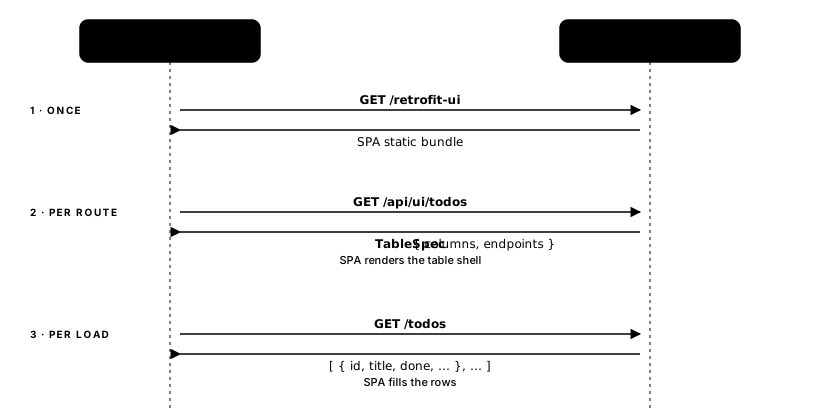
Request flow between browser and server: the browser fetches the SPA bundle once, then repeatedly fetches spec JSON and row data.
The SPA bundle is fetched once. Only the spec + row payloads change over time — no frontend redeploy when your schema grows.

The SPA itself never changes. When you add a column to your schema, the TableSpec JSON changes, and the browser renders the new column automatically on the next load.

The problem it solves

Every backend developer building internal tools hits the same wall: interesting frontend components require either adopting an opinionated tool (Retool does this well), or writing tightly coupled code that has to change in lockstep across the backend model, the API, and the frontend every time a schema changes.

The fix is a clean interface between layers — the same principle Kubernetes applied to infrastructure. retrofit-ui applies it to frontend/backend design: the spec JSON is the interface. Either side can evolve on its own schedule.

Three patterns this solves:

Pattern 1

CRUD API

  1. The setup

    You have an entity table — products, users, invoices. Every field added to the schema needs to propagate to the backend model, the API response, and the frontend that displays it.

  2. Where it snags

    When the UI lives in a separate codebase, the frontend step lags or gets skipped. Three places to update for every field.

  3. The retrofit-ui move

    The spec is derived from your schema. Add a field once; it appears in the table automatically on the next load.

  4. What survives

    Your existing REST endpoints stay untouched. The spec lives on a separate endpoint you define (/api/ui/* is the default convention, but you pick the URL) — no code generation, no scaffolding, nothing to maintain.

Pattern 2

Project page with admin tools

  1. The setup

    An internal page mixing prose or documentation with interactive components — forms, approval buttons, admin actions — that call real endpoints owned by the same service.

  2. Where it snags

    The interactive pieces require frontend code tightly coupled to the backend API — two codebases to keep in sync for what should be a single feature.

  3. The retrofit-ui move

    Drop a data-retrofit-src element into your page. The renderer fetches the spec and mounts the component wherever you place it — no framework, no build step.

  4. What survives

    The backend stays in builder code — types and method chains that backend engineers already know. Complexity is opt-in; you never touch the frontend unless you choose to.

Pattern 3

AI-generated content blocks

  1. The setup

    Structured output — a calendar, a summary grid, a timeline — that automation or a language model generates and needs to display without a custom frontend.

  2. Where it snags

    There is no rendering layer. The machine produces structured data, but something has to turn it into UI — which means a frontend someone has to build and maintain.

  3. The retrofit-ui move

    The model emits spec JSON. The renderer consumes it directly. The output is also the render instruction — no template layer, no component code between them.

  4. What survives

    The same renderer that handles hand-authored specs handles machine-generated ones. No special mode, no integration layer.

Three shapes of the same underlying problem — the client and the server owning duplicated knowledge of the UI. Each column reads top-to-bottom as a small story.
CRUD APIProject page with admin toolsAI-generated content blocks
You have an entity table — products, users, invoices. Every field added to the schema needs to propagate to the backend model, the API response, and the frontend that displays it.An internal page mixing prose or documentation with interactive components — forms, approval buttons, admin actions — that call real endpoints owned by the same service.Structured output — a calendar, a summary grid, a timeline — that automation or a language model generates and needs to display without a custom frontend.
When the UI lives in a separate codebase, the frontend step lags or gets skipped. Three places to update for every field.The interactive pieces require frontend code tightly coupled to the backend API — two codebases to keep in sync for what should be a single feature.There is no rendering layer. The machine produces structured data, but something has to turn it into UI — which means a frontend someone has to build and maintain.
The spec is derived from your schema. Add a field once; it appears in the table automatically on the next load.Drop a data-retrofit-src element into your page. The renderer fetches the spec and mounts the component wherever you place it — no framework, no build step.The model emits spec JSON. The renderer consumes it directly. The output is also the render instruction — no template layer, no component code between them.
Your existing REST endpoints stay untouched. The spec lives on a separate endpoint you define (/api/ui/* is the default convention, but you pick the URL) — no code generation, no scaffolding, nothing to maintain.The backend stays in builder code — types and method chains that backend engineers already know. Complexity is opt-in; you never touch the frontend unless you choose to.The same renderer that handles hand-authored specs handles machine-generated ones. No special mode, no integration layer.

The spec types

The spec is the contract between your server and the browser. Your server produces a spec JSON object; the browser renders it without any frontend code on your side.

retrofit-ui organises its spec types into three tiers:

Components — atomic views, each rendering one data shape:

SpecRenders
TableSpecData table with columns, sorting, pagination, optional inline editing, and CRUD actions
FormSpecCreate/edit form with field validation, derived from your schema
StatSpecKPI cards in a grid — values computed server-side
CalendarSpecCalendar view (month/week/day/list) with editable events
TimelineSpecVertical timeline of events with status variants (success, warning, danger)
TreeSpecHierarchical tree view with configurable selection and actions
MarkdownViewSpecMarkdown or HTML content fetched from an endpoint

Layouts — containers that position components without owning data:

SpecRenders
flex / gridFlex row/column or CSS grid that holds any combination of components

Higher-Order Components — specs that compose other specs:

SpecRenders
PageSpecA page with a title and a flex/grid root that holds any combination of components and layouts
WorkflowBundleA table paired with a form for side-by-side create/edit workflows

Column and field types are inferred from your schema automatically — z.string().email() becomes an email input, z.enum(...) becomes a select. You can override any individual column or field without touching the defaults.

Rendering modes

There are two primary rendering modes and one advanced option:

Server-driven — serve the pre-built SPA bundle at /retrofit-ui. The browser loads it once, then fetches specs from a base URL you choose (the default is /api/ui, but any prefix works) and renders the right component. The bundle never changes; your spec endpoints do. Best for dedicated admin tools where retrofit-ui owns the entire page.

Spec-driven — load the renderer script and embed views using data-retrofit-src (fetch a spec from a URL) or data-retrofit (inline the spec JSON directly). Your page owns routing and layout; retrofit-ui fills specific containers. Best for dropping isolated blocks into pages you already own.

Advanced: you can also import SpecRenderer and individual view components directly from @retrofit-ui/spa-solid-shoelace/components as native SolidJS components with reactive props. This gives you full control for SolidJS apps — though the API here is still evolving as we zero in on frontend design choices.

Server-driven advantages

When the server builds the spec, it can embed exactly what it already knows — the data source, the actions, the validations, and the display formatting — without the browser needing to understand where anything comes from. Change a field, add an action, or adjust pagination on the server, and the next page load reflects it with no frontend deploy.

Spec-driven mode trades some dynamism for simplicity: you inline a spec (or point at a static URL) and the browser renders it as-is. It's the right choice when the shape doesn't change at runtime.

What retrofit-ui is not

  • It is not a general-purpose web app framework for hand-authored, pixel-perfect marketing pages. It renders declarative components your server describes — CRUD tools being the most common. For pixel-level control or complex client-side state, use a traditional SPA or SSR framework.
  • It does not generate code. The SPA is a pre-built bundle you serve as static assets. There is no scaffold step, no generated frontend files to maintain.
  • It does not replace your REST API. Your existing endpoints stay unchanged; the spec endpoints sit alongside them. retrofit-ui reads from your data endpoints — it does not own them.
  • It is not Retool or a no-code platform. Retool gives non-engineers a visual builder. retrofit-ui gives engineers a code-first way to describe UI in the same language they already use. You're still writing code — just less of it, and only on the backend.